Artificial Intelligence for Games 101 – Navigation Meshes

Previous Post: Introduction to Artificial Intelligence

For this, I will explain using Unreal Engine as my examples, though this works similarly for other Engines like Unity.

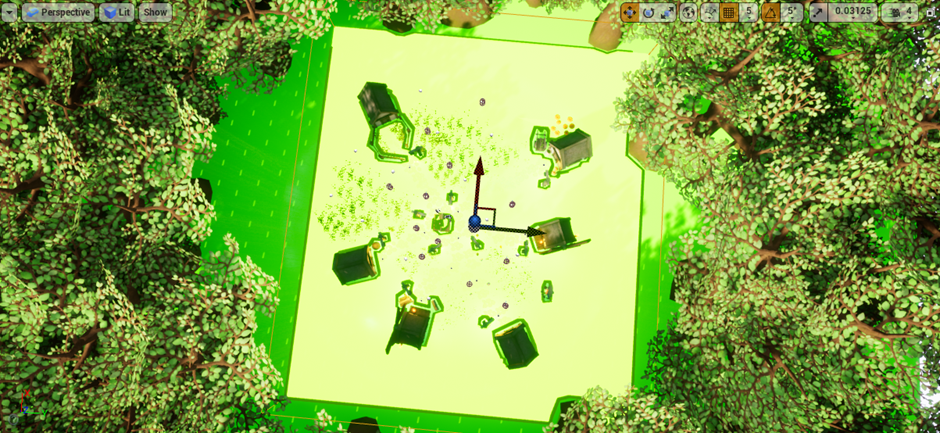
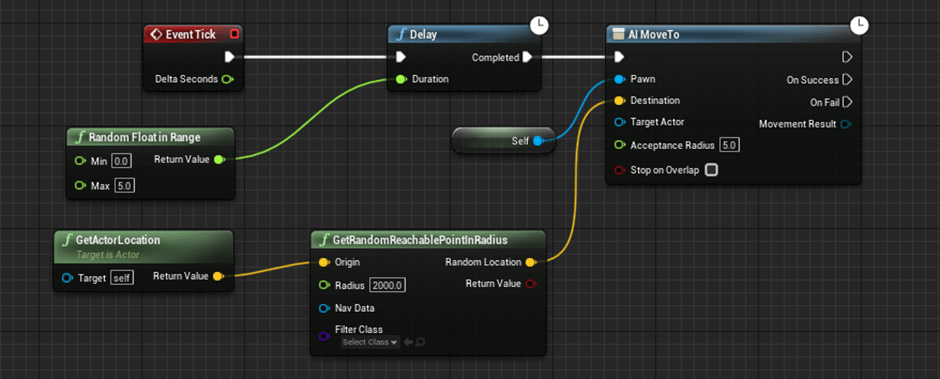
An AI Mesh is a type of Data Structure that shows the AI where it is allowed to move. In UE4 this can be placed in using the NavMesh Volume class, which can then be seen as a green layer by pressing P. This can be used in conjunction with either of two pre-built navigation functions called “Get Random Reachable Point in Radius” or “Get Random Point in Navigable Radius” – with the latter being faster but often causing bugs like the character crashing into walls. Here is an example I used in one of my previous projects:

Previous coursework required me to move the AI randomly within the Nav Mesh

Navigational Meshes work by breaking down geometry into different regions, breaking down into even smaller surfaces when it is close to a blockage. This can also be done to show different regions that can be used to make a game more realistic and immersive, such as the Civilians in GTA walking along paths as opposed to walking into the middle of the road all the time. It is also what allows the cars to move on the road instead of crashing into civilians on the pavement all the time. Although for a game like that to keep its “realism”, it is fine to have a couple of civilians every now and then deciding to walk along the road. Breaking down the geometry into different sections allows the AI to create a Search algorithm, giving each section a number and the higher the number is, the better route it would be. As this is done within microseconds, AI seems to just walk around normally even though it has to calculate every minor detail. This is why games like GTA can be so expensive / Demanding to run. This is what Nav Meshes look like in Unreal:

Navigation Mesh in Unreal

In UE4, Nav Meshes appear to be a big box, with anything inside it being a new Navigable Area. If you use this but you can’t see it, you just need to press ‘P’ and it will show as Green for any walkable area.

What to Read Next

AI Algorithms: Dijkstra and A*
AI Algorithms: Flow Fields
Finite State machines

Artificial Intelligence for Games 101 – Finite State Machines

Previous Post: Introduction to Artificial Intelligence

A Finite State Machine is a model that simulates sequential logic. It comes from two models created by Edward F. Moore and George H. Mealy. It generally consists of a series of States of which one of them is active until an event is received, causing it to change to a different state. This could be used in a game to make an enemy Idle then when an enemy is spotted change to an attack state.

The first use for FSMs was the 1998 Cult Classic “Half Life” by Valve Software. This game would use Finite State Machines to incorporate humanlike action between NPCs, allowing Combines to properly “communicate” between each other and give an almost real-life combat between the Player and the enemies. The use of Finite State Machines was so well done, it is now just incorporated into basically every modern game since the early 2000s.

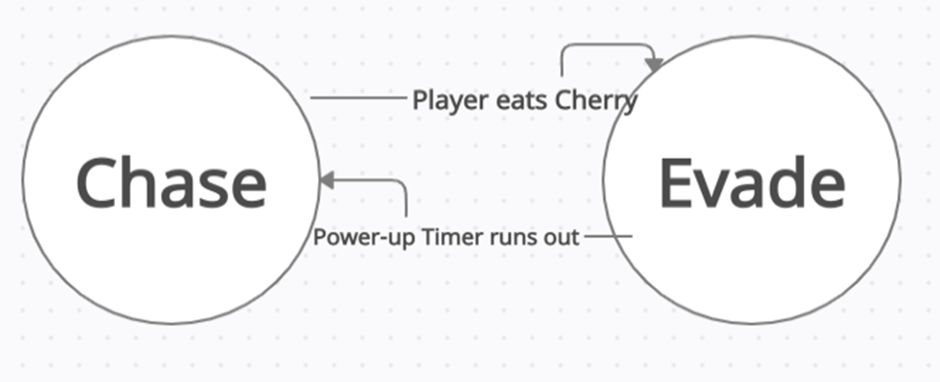
Finite State Machines have various ways of being shown, sometimes through the use of UML Diagrams though this is mostly for the developers to know what they are needing to do for the AI Behaviours. An example of a FSM Diagram is shown below:

A Finite State Machine used for Ghosts in PacMan

A Finite State Machine requires at least 2 states and some method to transition between each state. Some states may only be able to transition in one direction, whereas some can transition either way.
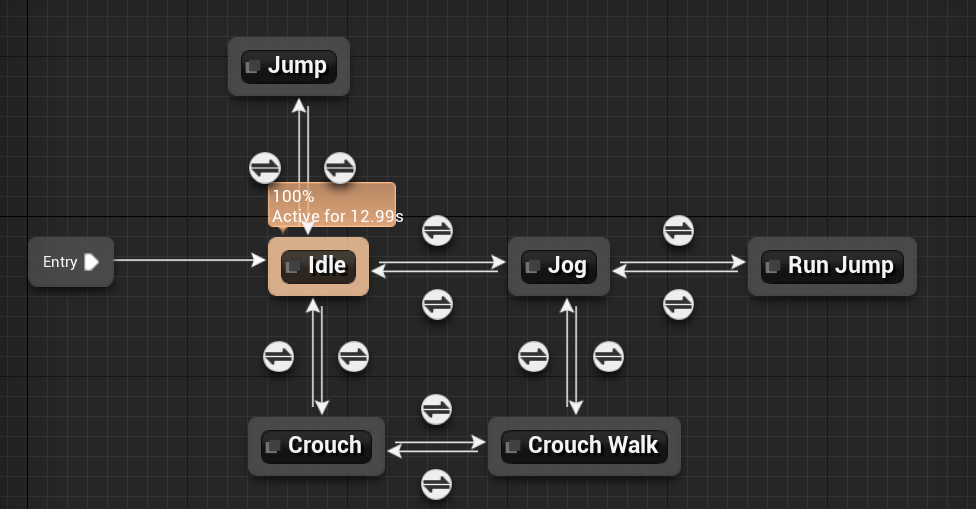
The Diagram below shows how Unreal Engine uses Finite State Machines to deal with Animations. In this example, Idle is attached to Entry (allowing it to actually start animating), which then has a transition between jogging and crouching. Note, Jogging isn’t attached to Crouching as people don’t tend to crouch and jog at the same time – so to get around this, they have a “Crouch Walk” animation. Similarly there is a Jump animation, then a “Run Jump” animation just to make sure they flow properly between each other.

Finite State Machine being used in the Animation Blueprint of Unreal Engine 4

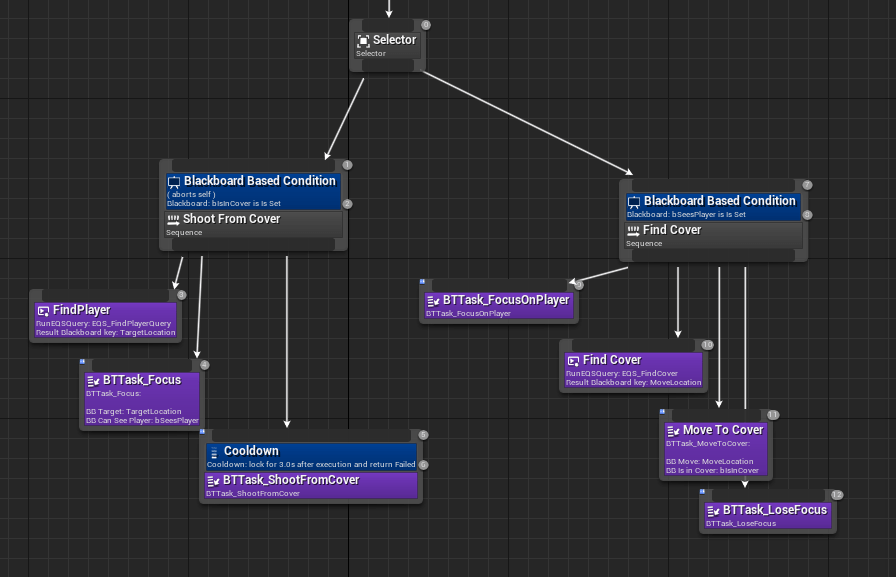
A Behaviour Tree is another variation of the Finite State Machine, though this is more focussed on the action of the AI.

Behaviour Tree in Unreal Engine 4

Most modern Game Engines like UE4 and Unity have some form of in-engine FSM design system. As I am mostly using Unreal, I will likely use this as my frame of reference, and will talk about this further in my Games report for each AI Scenario for my Final Project. Unreal Engine has Blueprints and C++ to create an FSM, but Blueprints is easiest to use as it can visually show you each State.

What to Read Next

AI Algorithms: Dijkstra and A Star
AI Algorithms: Flow Fields
Navigation Meshes

Artificial Intelligence for Games 101 – Dijkstra’s Algorithm & A* Algorithm

Previous Post: Introduction to Artificial Intelligence

Edsger W. Dijkstra created the algorithm in 20 minutes when out shopping with his Fiance. The main objective of this Algorithm is to calculate the shortest path from one point to another. This is practical in a lot of different sections for Artificial Intelligence including Games and Satellite Technology. Surprisingly, Facebook uses such an Algorithm to recommend Friends – finding the “shortest path” between people, aka ‘Six Degrees of Separation’.

How to use Dijkstra

Dijkstra’s Algorithm initially notes every non-visited point at a distance of infinity, as the algorithm is currently unaware of the distance. After all are labelled, you can select the starting point and give it a Distance of “0” as we are currently there. These points are all put inside a Queue / Array of “Incomplete Points”.

The next step is to go through each neighbouring point to the “current” point and label their distances. Each of these points will now have a “distance” and a “total distance”, with the total distance being the previous point + next point. In the case of the first point, it’s distance is 0 anyway, so it would be whatever the next distance is + 0.

Once the algorithm has scanned all neighbouring points, it selects the shortest distance as the current point, and puts the previous point as it’s “Parent” point while moving the previous point into a new “Completed” Queue so it can’t go back through it. Then it follows the same technique, checking every neighbouring point (except the previous one) to find the shortest.

After it has gone through this next point, it will backtrack and go to the next neighbour of the previous point, following the same method as before. Eventually once all neighbouring points have been checked and labelled correctly, it goes to the current shortest point depending on each of the “distances” and repeats same as before.

This goes on until eventually the Algorithm reaches the final destination. Once done, it runs through each parent starting at the End Point and working it’s way backwards, thus giving the final result – A complete path!

A Star Algorithm

A Star Algorithm is a variation of Dijkstra’s Algorithm, but this time it uses a Heuristic function to find the shortest path and also calculates the distance from each point to the final point – preventing it from possibly backtracking as much as Dijkstra’s sometimes can. As an example, with Dijkstra’s algorithm in Motorways, there may be a small amount of traffic down one junction so it could recommend going all the way in the opposite direction before figuring out to go the correct way. Whereas A Star recognises this adds on extra unnecessary time. This makes A Star faster in some aspects, though choosing between either Algorithm is dependant on the users needs.

The Heuristic Function and Distance To Target can make A Star quite effective in that it doesn’t need to check every single point once it knows what the shortest path currently is, cutting run time potentially massively depending on how big of a graph it needs to check.

The Pseudocode for A Star isn’t much different from Dijkstra’s, except for an added “Distance to Target” variable for each point.

What to Read Next

AI Algorithms: Flow Fields
Finite State Machines
Navigation Meshes

Artificial Intelligence for Games 101 – An Introduction to AI

What is AI?

AI stands for Artificial Intelligence. The general definition for Artificial Intelligence is a Machine that can interpret and possibly learn from a set of data, then use that data to adapt and achieve the goals it is set to do. An example of this used in the real world is having your phone recognise your face to unlock it by taking a photo of you then being able to compare what the camera is currently seeing to that photo, thereby knowing the person on the camera is you. Other examples would be helpers like Alexa or Cortana.

AI is a relatively new field. It was first coined by John McCarthy in 1956, during a Dartmouth Conference which he called the “Dartmouth Summer Research Project on Artificial Intelligence”.

There are two main things that have enabled AI to become more prevalent and available in the modern world: More data and more computing power. Back when they first thought about AI there was not anywhere near enough power to have an Alexa sat in their living room. In terms of Data, the rise of Social Media and the internet has enabled companies such as Facebook and Amazon to create machines that can interpret users online and feed that into a fully learning AI, though unfortunately we are still decades away from having JARVIS style helpers.

Different Styles of Learning

Supervised Learning: learning with a supervisor who knows what they are doing to be able to correct any mistakes. This is the kind of learning that is done in schools with students and teachers.

Reinforced Learning: This is a method of learning through feedback from behaviour.

Unsupervised Learning: This is a process by which you learn without labels. It is often referred to as Clustering or Grouping.

What does this mean for Games?

AI in games is used for a number of different reasons. One of the most important things for AI in games is to enhance the users experience using a variety of different methods:

  1. NPC characters to make worlds feel more alive, such as the AI System used in Skyrim and Oblivion (Bethesda’s “Radiant AI” – known for amazing conversations between characters that are 100% natural) This system told the AI where to go and when to go there but gave the characters their own options of how they want to get there.
  2. Create a challenge for the player if they are in an online or offline match. It is not uncommon for online matches to run low on players and if they do, the servers will place a couple of AI team mates and enemies to help the teams out. The key to doing this properly is to have the AI not be too difficult, but also not too easy. So while it may get a lot of kills, it should be easy enough for the player to get an easy shot on it while it is reloading.

What to Read Next

AI Algorithms: Djikstra’s Algorithm & A Star
AI Algorithms: Flow Fields
Finite State Machines
Navigation Meshes
References:
Russell, Stuart (1995). Artificial Intelligence: A Modern Approach. Berkeley: Prentice Hall

PBS Crash Course. (2019). What Is Artificial Intelligence? Crash Course AI #1. Available: https://www.youtube.com/watch?v=a0_lo_GDcFw&ab_channel=CrashCourse. Last accessed 24th November 2021.

PBS Crash Course. (2019). Supervised Learning: Crash Course AI #2. Available: https://www.youtube.com/watch?v=4qVRBYAdLAo&ab_channel=CrashCourse. Last accessed 24th November 2021.

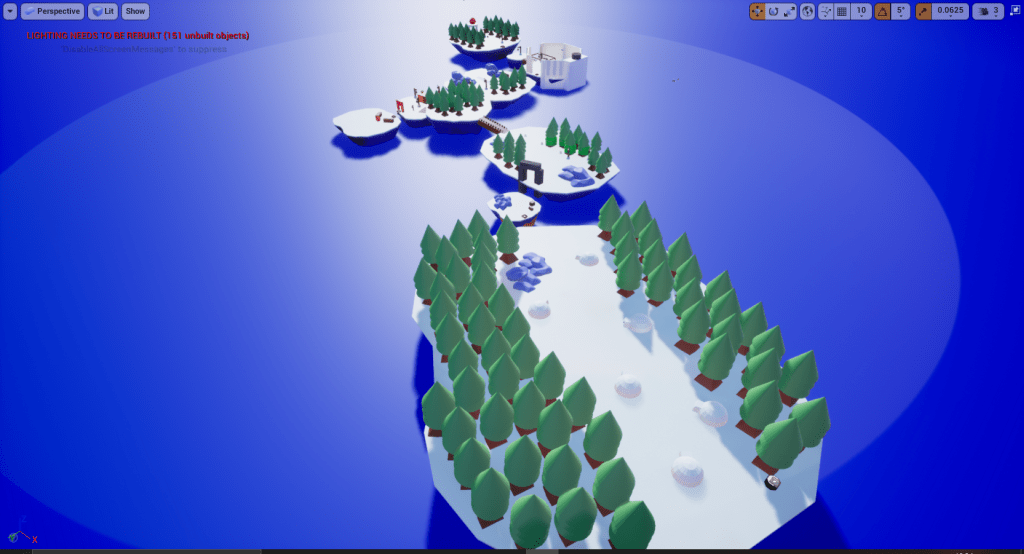
Islands

​This was my coursework for Final Year, First Semester – Games Engine Architecture.

For this coursework I had to create a Vertical Slice for a game idea of my choice. This also included creating a detailed Level Blockout, a GDD (Game Design Document), and a TDD (Technical Design Document).

I had the idea of making similar mechanics to the Toys To Life genre of games, where the Player has a set of characters to choose from and can change at any time. This also acts as a life system, meaning if one character Dies they can’t be used for the rest of the level but will be available if it is restarted / new level is opened. 

I used C++ to create the Base templates for the weapons, Camera, and characters, then used Blueprints to edit them as individuals. Using Tags I was also able to set which characters are the “Player” and which ones are just enemy AI as my Camera specifically looked for a tag to know where to move. 

I will continue to update this game and make it more fleshed out, along with fixing any bugs during any free time I get.

Click here to download the Code!

Click here to view Gameplay!

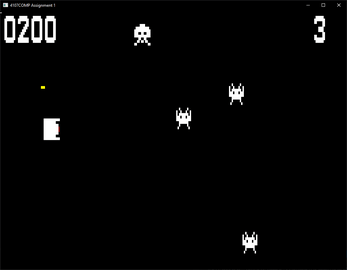
ASCII Invaders

Created in my first year of Uni, in which we were given a proprietary university game engine and told to create Space Invaders but sideways. In this project, one of my favourite features I implemented was a boss fight every 5 rounds using a Modulo function to check if the Level is a multiple of 5. The boss was just a scaled up variant of the Player character that moves up and down the screen while firing bullets in 8 different directions every 2 seconds. This I feel is a very difficult challenge for the Player, so makes it all the more satisfying when you manage to beat it! Programmed in C++

Click here to download Source code

Untitled ADIDAS Game – Game Design Document

In my first year, we had to work as a group to make a top down game using Unreal Engine 4 along with a Game Design Document. For this I took the role of Lead Game Design. This role required me to convey a few different Ideas to the rest of my group while ensuring that the ideas were compatible with the skillset of the team. For this, I had to design a few basic paper prototypes so that my team could properly understand the level of work that we were aiming to do. I took in the ideas and feedback of the team then implemented that into the final prototype, which ended up working out well for my team! At the end, we had to write a Game Design Document.

Check out the GDD here!

DropFox

Created as part of the Wowie Jam 2.0 using Unity 5. Consists of simple tilt controls on Android and Cursor control using PC. For this project, I worked for 3 days on my own, creating everything from scratch including the code to move the player and the art used in the game. I was pleased with the results so decided it would make a great Mobile game since it was inspired by the likes of Flappy Bird and Doodle Jump. Programmed in C#

Click here to Play